Why Do Phone Cameras Have Multiple Lenses? Understanding Different Camera Types in Your Smart Phone
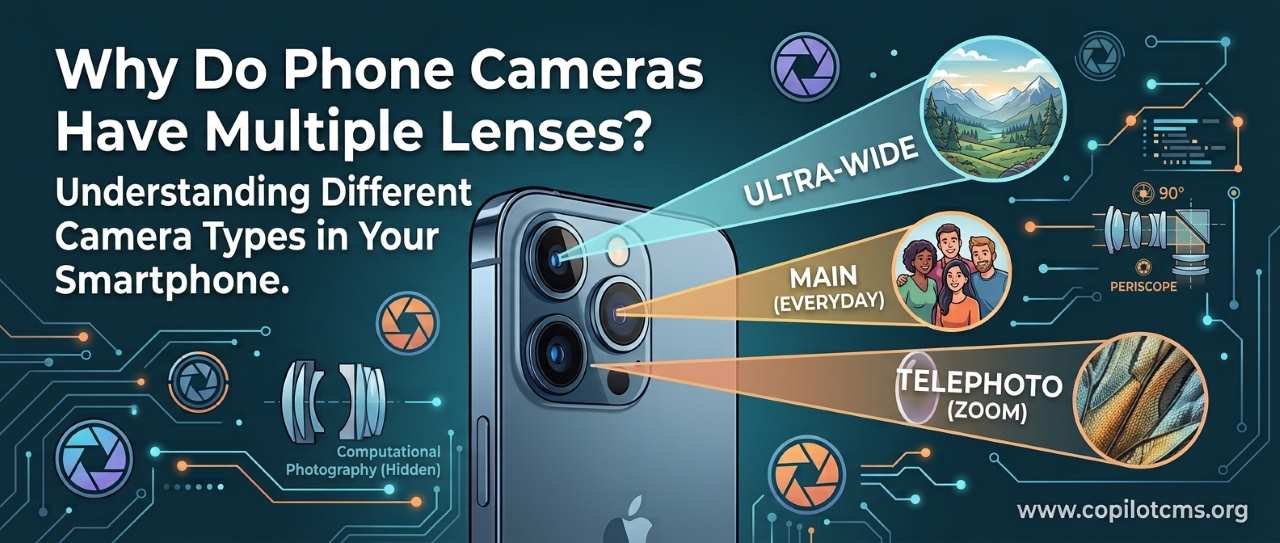
Have you ever looked at the back of a modern smartphone and wondered why it needs three, four, or even more camera lenses? The surprising answer is that those cameras are not simply taking the same picture several times—they are giving your phone different ways to see the world.
Why Doesn't One Camera Lens Do Everything?
A traditional camera can often change its lens to photograph different subjects. A wide lens is useful for landscapes and groups, while a telephoto lens is better for distant objects. A smartphone has a problem: it is extremely thin.
There isn't enough physical space inside a slim phone for one camera lens to move back and forth very far or to contain a large, complicated zoom mechanism. So smartphone manufacturers came up with a clever solution: instead of making one camera do everything, they put several smaller cameras next to one another.
Each camera is designed for a particular job. The phone's software then decides which camera—or combination of cameras—is most useful for the photograph you are taking.
The Real-World Version: A Set of Different Eyes
Imagine that you are standing outside a house with three friends. One friend has excellent eyesight for seeing the whole scene. Another has binoculars and can see something far away. The third has a magnifying glass and is good at examining something close up.
They are all looking at the same world, but they are equipped for different jobs.
That's roughly what happens with multiple smartphone cameras. The phone may have:
- A main camera for ordinary photographs.
- An ultra-wide camera for fitting more of a scene into the picture.
- A telephoto camera for bringing distant subjects closer.
- A macro camera for photographing very small objects from close range.
- A depth or specialized sensor on some phones to help understand distances or assist with particular photography features.
Not every phone has all of these. Some phones use two cameras, others three or four, and some use additional sensors that aren't really conventional cameras at all.
The Main Camera: Your Everyday Camera
The main camera is usually the most important camera on the phone. It is designed to produce good photographs across a wide range of everyday situations.
If you simply open the camera app and press the shutter button, the phone will normally start with the main camera.
It is often equipped with the phone's largest or highest-quality image sensor. The sensor is the electronic component that captures light and turns it into digital information.
Why Is the Main Camera So Important?
Photography is fundamentally a battle with light. More useful light generally gives the camera more information to work with, while poor lighting makes photography harder.
A larger sensor can capture more light, which can help produce cleaner photographs, especially in darker conditions. This is one reason why the main camera can sometimes produce a much better photograph than another camera on the same phone, even when both appear to have similar megapixel numbers.
The Ultra-Wide Camera: Seeing More
Imagine trying to photograph an entire football stadium while standing relatively close to it. With an ordinary lens, you might have to walk backward to fit everything into the frame.
An ultra-wide camera solves this problem by showing a much wider portion of the scene.
It is useful for:
- Large groups of people
- Landscapes
- Buildings and architecture
- Small rooms
- Travel photographs
- Scenes where you simply cannot move far enough backward
The trade-off is that very wide lenses can make objects near the edges look stretched or distorted. This is particularly noticeable when photographing people close to the edge of the frame.
The Telephoto Camera: Bringing Distant Things Closer
Now imagine you are sitting far away from a performer at a concert. You cannot physically walk closer, but you want a photograph that shows the performer rather than the entire stage.
A telephoto camera is designed for this kind of situation. It has a narrower field of view, making distant subjects appear larger in the photograph.
This is what people usually mean when they talk about a phone's optical zoom.
Optical Zoom vs. Digital Zoom
These two terms sound similar but work very differently.
Optical zoom uses the camera's optics to magnify the scene before it reaches the image sensor. A dedicated telephoto camera can provide this without simply throwing away image information.
Digital zoom is more like taking a photograph and then cutting away the edges to make the subject appear larger.
For example, imagine taking a photograph of a person on a distant stage. If you crop the photograph heavily, the person occupies more of the screen, but you have not actually captured more detail. You have simply enlarged a smaller portion of the original image.
Modern phones can make digital zoom considerably better through computational photography, but digital enlargement still has fundamental limits.
What Is a Periscope Camera?
Some high-end smartphones advertise a "periscope" or "folded" telephoto camera. The name sounds like something from a submarine, and the basic idea is related.
A conventional camera lens needs physical depth. But a smartphone is thin, so there isn't much room for a long lens arrangement pointing straight through the phone.
A periscope-style system turns the optical path sideways inside the phone. A small prism or mirror redirects incoming light, allowing the phone to fit a longer optical system into its relatively thin body.
Think of it like trying to fit a long hallway inside a small building. Instead of building the hallway straight from one end to the other, you make it turn a corner. The hallway is still long, but it fits into a smaller space.
The Macro Camera: Getting Very Close
Macro photography is about photographing tiny subjects from extremely close distances.
You might use it to photograph:
- The tiny details of a flower
- The texture of fabric
- Small insects
- Details on jewelry
- The surface of an object
A normal camera may struggle when you move extremely close to something because its lens cannot focus at that distance. A macro camera is designed to focus much closer.
However, not every smartphone's macro camera is particularly high quality. On some less expensive phones, the macro camera has a relatively low-resolution sensor and may be included more for versatility than for producing the best possible images.
What About the Camera That Has No Obvious Lens?
Some phones have additional sensors that look like tiny cameras but have specialized purposes.
For example, a phone may include a depth sensor or another type of sensing hardware. Depending on the device, such hardware can help estimate how far objects are from the phone.
This information can be useful for features such as portrait effects, augmented reality, autofocus, or other computational photography functions.
Importantly, the exact hardware varies considerably from one smartphone to another. A circular opening on the back of a phone does not automatically mean that it is a separate full-fledged camera.
So Does Every Lens Take the Same Picture?
No. Each camera generally has its own lens, image sensor, and characteristics.
Even if two cameras have the same number of megapixels, they can behave very differently. Their sensors may have different sizes, their lenses may capture different amounts of light, and their fields of view may be completely different.
Think about having several windows in a house. One window might be large and face a garden, another might be small and face the street, and another might be high up and face the sky.
They are all windows, but they don't give you the same view.
How Does the Phone Decide Which Camera to Use?
This is where things get particularly interesting.
When you tap a zoom level such as 1×, 2×, 3×, or 5×, you might assume that the phone is simply switching between lenses. Sometimes it is, but modern smartphones are more complicated than that.
The phone's software considers several factors, including the requested zoom level, lighting conditions, focus distance, and the capabilities of the available cameras.
For example, if you select a high zoom level in bright daylight, the phone may use a dedicated telephoto camera. In very dark conditions, however, it may decide that the main camera can produce a better result because its sensor and lens can capture more light.
The result is that the zoom number you see on screen does not always correspond to one physical lens.
The Secret Ingredient: Computational Photography
Multiple cameras are only part of the story. Modern smartphone photography also depends heavily on software.
Imagine taking several photographs of the same meal and giving them to a skilled editor. One photograph has better detail in the shadows, another has better highlights, and another has less noise. The editor could combine useful information from all of them into a final photograph.
A smartphone can perform a version of this process automatically and extremely quickly.
What Can the Software Do?
Depending on the phone, computational photography can help with:
- Reducing image noise
- Improving photographs taken in low light
- Combining multiple exposures
- Increasing dynamic range
- Improving HDR photographs
- Detecting faces and subjects
- Separating people from backgrounds
- Sharpening details
- Correcting lens distortion
- Choosing between different cameras
- Producing portrait effects
So when you press the shutter button, your phone isn't necessarily just recording what one sensor saw. It may be doing a surprisingly large amount of processing before showing you the final photograph.
Why Does the Camera App Sometimes Switch Lenses?
You may have noticed that the phone seems to change cameras when you zoom in or out.
For example, moving from a wide view to a telephoto view may cause the phone to switch from one camera to another. You might even notice a small change in brightness, framing, or image quality during the transition.
That's because the phone is changing its source of information.
In some situations, however, the phone may avoid switching cameras. If the dedicated telephoto camera performs poorly in darkness, the phone may use the main camera and crop the image instead.
This can feel strange because the number displayed on the screen may stay the same while the physical camera being used changes.
Why Do Some Phones Have Three Cameras but Others Have Four?
More cameras do not automatically mean better photographs.
Manufacturers choose different combinations depending on the type of phone they are building. A phone might prioritize low-light photography, long-distance zoom, ultra-wide photographs, portraits, or other features.
Some phones also use additional cameras or sensors for specialized tasks rather than ordinary photography.
So counting the circles on the back of a phone is not a reliable way to judge its camera system.
Why Doesn't the Phone Just Use One Really Good Camera?
This is a reasonable question. If smartphone manufacturers can make excellent camera sensors, why not build one camera that does everything?
The biggest obstacle is physics.
A camera that can capture a very wide scene and a camera that can provide strong optical magnification have different optical requirements. Traditional cameras solve this by using interchangeable lenses or larger zoom lenses.
A smartphone has to fit its camera system into a very small space while also leaving room for the battery, processor, speakers, antennas, cooling components, and other hardware.
Multiple cameras allow the manufacturer to give the phone several different optical "tools" without requiring one enormous lens system.
Why Do Phone Cameras Have Different Shapes?
If you look closely at a multi-camera phone, you may notice that the camera openings are not all the same size.
That's because the cameras may have different lenses and sensors. A larger opening can accommodate different optical hardware, while another camera may require a different arrangement.
The lenses themselves also need different shapes and designs depending on what they are trying to accomplish.
Why Do Smartphone Cameras Struggle at Night?
Multiple cameras don't magically eliminate the basic problem of photography: light is limited at night.
Imagine trying to read a book in a dark room. You can have the world's best eyesight, but if there isn't enough light reaching your eyes, reading becomes difficult.
A camera faces a similar problem. In low light, it has to work harder to collect enough information.
The phone can respond by increasing exposure time, increasing sensor sensitivity, combining multiple photographs, or using sophisticated image processing. But these techniques have trade-offs.
This is also why a phone may sometimes use its main camera instead of its telephoto camera at night: the main camera may be better equipped to gather enough light.
What Does "Megapixel" Have to Do With It?
A megapixel is simply a unit describing the number of pixels captured by an image sensor. One megapixel represents roughly one million pixels.
It is tempting to think that a 50-megapixel camera must automatically be better than a 12-megapixel camera. But photography isn't that simple.
Sensor size, pixel design, lens quality, image stabilization, available light, focusing, and software processing can all have a major effect on the final photograph.
Think of megapixels as the number of seats in a cinema. Having more seats tells you something about the cinema, but it doesn't tell you how comfortable the seats are, how good the screen is, or how well the sound system works.
Why This Matters When Taking Photos
Understanding the different cameras can actually make you a better smartphone photographer.
Use the Main Camera for Everyday Photography
For ordinary photographs, especially in challenging lighting, the main camera is often a good starting point.
Use Ultra-Wide for Big Scenes
If you cannot fit an entire building, landscape, or group of people into the frame, try the ultra-wide camera.
Use Telephoto for Distant Subjects
When your subject is far away, a genuine telephoto camera can give you more useful detail than simply cropping an ordinary photograph.
Be Careful With Extreme Zoom
Once you move beyond the phone's optical capabilities, the software may increasingly rely on cropping and computational processing. The photograph can still look impressive, but fine details may eventually become less reliable.
Try Moving Your Feet
Sometimes the best "zoom" is simply walking closer.
If it is safe and practical to do so, changing your physical position can often produce a better photograph than using extreme digital zoom.
A Simple Way to Remember the Camera System
You can think of a smartphone's cameras as a small toolbox:
- Main camera: the general-purpose tool.
- Ultra-wide: the tool for seeing more.
- Telephoto: the tool for seeing farther.
- Macro: the tool for seeing tiny details up close.
- Depth or other sensors: specialized tools that help the phone understand or measure parts of the scene.
- Computational photography: the clever assistant that combines and processes what those tools see.
The important idea is that the phone isn't carrying several identical cameras. It is carrying several different ways of looking at the same world.
Common Misunderstandings
"More Cameras Always Means Better Quality"
Not necessarily. A phone with two excellent cameras can produce better results in some situations than a phone with four mediocre ones.
"Every Camera Works at Every Zoom Level"
Usually not. Different cameras are optimized for different fields of view and purposes. Software may also decide not to use a particular camera under certain conditions.
"Digital Zoom Is Completely Useless"
Not at all. Modern phones can use sophisticated computational techniques to make digitally enlarged photographs surprisingly good. The important point is that digital zoom cannot create unlimited genuine detail from nothing.
"Megapixels Tell You Which Camera Is Better"
Megapixels are only one specification. Sensor size, lens quality, stabilization, focusing, light, and image processing all matter too.
Troubleshooting: Why Does My Zoom Look Bad?
If photographs look blurry, noisy, or strangely processed when you zoom in, several things may be happening.
- You may be beyond the phone's optical zoom range. The phone may be relying heavily on digital enlargement.
- There may not be enough light. The phone may have switched away from a telephoto camera to a brighter main camera.
- Your subject may be moving. Zoom makes camera movement and subject movement more noticeable.
- The lens may be dirty. Fingerprints and dust can make photographs look hazy, especially around bright lights.
- The phone may be processing the image aggressively. Noise reduction and sharpening can sometimes make fine textures look unnatural.
A simple first step is to clean the camera lenses gently with a soft, clean lens cloth and then try the photograph again in better light.
Why Phone Cameras Keep Getting Better
Smartphone photography is advancing through a combination of better hardware and smarter software.
Manufacturers can improve sensors, lenses, optical stabilization, autofocus systems, and processing hardware. At the same time, increasingly sophisticated algorithms can analyze photographs and combine information in ways that would have required considerably more manual work in the past.
The result is a camera system that is much more than a collection of lenses. It is a small imaging computer that happens to fit into your pocket.
The Takeaway
Phone cameras have multiple lenses because one tiny camera cannot be physically optimized for every photographic situation. The main camera handles everyday shots, ultra-wide cameras show more of the scene, telephoto cameras bring distant subjects closer, and specialized cameras can handle tasks such as macro photography or depth sensing.
The real magic happens when these different pieces of hardware work together with software. Your smartphone effectively carries a small toolbox of different "eyes" and chooses the right combination to turn the scene in front of you into a photograph.