Follow a Message from Your Phone to the Recipient's Phone
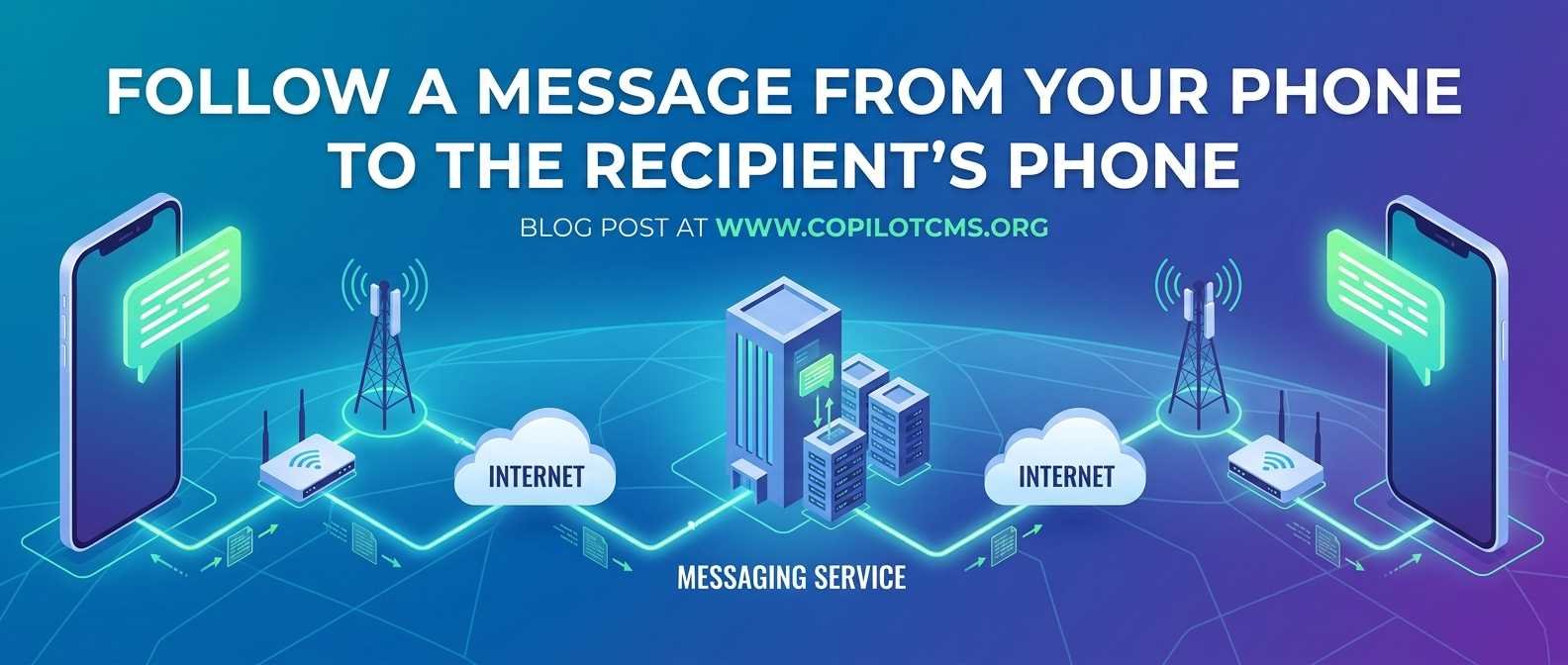
When you tap Send on your phone, your message seems to travel almost instantly from one screen to another. But what actually happens between those two phones? Let’s follow a message step by step and see how it crosses networks, computers, and sometimes even thousands of miles before appearing on the recipient’s screen.
What Happens When You Press “Send”?
Imagine that you type, “Hello!” to a friend and press the Send button. It is tempting to imagine the words themselves travelling directly from your phone to your friend's phone, like a tiny electronic letter flying through the air.
That is not quite what happens.
Your phone first turns the message into digital information that computers and networks can handle. That information is then divided into small pieces, called packets, and sent through a series of network connections until it reaches the service that is responsible for delivering the message to your friend.
Eventually, the recipient's phone receives the information, puts the pieces back together, and the messaging app displays the original message on the screen.
The Real-World Version: Sending a Parcel
A useful way to understand this process is to imagine sending a parcel to someone in another city.
You do not normally throw the parcel directly toward your friend's house. Instead, you hand it to a local delivery service. The parcel may go to a local sorting centre, then to a regional distribution centre, and eventually to a delivery office near your friend. A delivery person finally takes it to the recipient's house.
Sending a digital message works in a surprisingly similar way.
- Your phone is like the person sending the parcel.
- Your Wi-Fi or mobile network is like the local delivery service.
- Internet routers are like sorting and distribution centres.
- The messaging service's servers are like a central delivery facility.
- The recipient's network carries the message toward its destination.
- The recipient's phone is the final delivery address.
The digital version is much faster, of course. Instead of taking hours or days, the journey can often take less than a second.
Step 1: Your Phone Creates the Message
Suppose you type:
Hello, are you free this evening?
Your phone stores this information digitally. Computers do not internally handle words as humans do. At the lowest level, everything is represented using patterns of numbers, ultimately expressed as bits—zeros and ones.
You do not need to understand binary mathematics to use messaging. Think of it as a language that electronic devices understand. Just as humans use words and sentences, computers use digital patterns.
Your messaging app also knows important information about the message, such as which conversation it belongs to and which recipient should receive it.
Step 2: The Message Is Prepared for Transmission
Before leaving your phone, the message is prepared for transmission across a network.
Depending on the application and protocol being used, the information may be encrypted, formatted, and divided into smaller units suitable for transmission.
Encryption is especially important. It can transform readable information into a form that is extremely difficult for an unauthorized person to understand.
For example, you may see:
“Meet me at 7.”
But the information travelling through the network may not look anything like those words. With end-to-end encryption, the intended recipient's device is designed to be able to decrypt the message.
The exact security process depends on the messaging service. Not every messaging system uses end-to-end encryption in the same way.
Step 3: Your Phone Connects to a Network
Now the message needs a way out of your phone.
Your phone may be connected to the internet through Wi-Fi or through a mobile network, such as 4G or 5G.
If You Are Using Wi-Fi
Your phone sends the information to your Wi-Fi router.
The router is the device that connects your local network to the wider internet. In a home, it is often the box supplied by your internet service provider.
Think of the router as the first major intersection outside your house. Your phone knows that the message needs to leave your local network, so it hands the information to the router, which knows where to send it next.
If You Are Using Mobile Data
If Wi-Fi is turned off and mobile data is being used, your phone communicates with a nearby cellular network through radio signals.
Your phone sends information to a nearby cellular base station. From there, the mobile operator's network carries the traffic toward the wider internet or toward the relevant messaging infrastructure.
This is why your phone can send messages while you are travelling, even when you are nowhere near your home Wi-Fi router.
Step 4: The Message Enters the Internet
Once the message leaves your local network, it may travel through many different pieces of networking equipment.
This is where routers become extremely important.
A router's basic job is to examine information about where data needs to go and choose an appropriate path for forwarding it.
It is similar to a road junction. If a driver wants to reach another city, every junction does not need to know the entire journey in human terms. It simply needs to direct the vehicle toward an appropriate next road.
Digital networks work in a similar fashion. A packet may pass through several routers before reaching its destination.
What Exactly Is a Packet?
A packet is a small unit of data sent across a network.
Imagine that instead of sending one enormous box containing an entire book, a delivery company divides the book into many smaller packages. Each package can be transported through the delivery system and eventually the pieces can be assembled again.
Digital communication often works in a similar way.
A message, image, voice recording, or video can involve a large amount of digital information. The network carries that information in smaller units rather than treating the entire communication as one gigantic object.
The networking systems involved keep track of where the information should go and, when necessary, how the pieces should be handled.
Step 5: The Message Reaches the Messaging Service
For an internet-based messaging app, the message usually does not simply travel directly from your phone to your friend's phone.
Instead, it normally communicates with infrastructure operated by the messaging service. These computers are commonly called servers.
A server is essentially a computer designed to provide services to other computers over a network. Large technology companies may operate enormous numbers of servers in data centres around the world.
When your phone sends a message, the messaging service can use its infrastructure to determine what should happen next.
Depending on the service and its design, the infrastructure may authenticate your account, process the message, route it toward the recipient, temporarily store information when necessary, and handle delivery-related events.
Why Does the Message Need a Server?
You might wonder: if my phone knows my friend's phone number or account, why can't it simply send the message directly?
Sometimes devices can communicate directly in certain networking situations, but modern messaging systems usually need much more than a simple phone-to-phone connection.
Your friend might have their phone switched off. They might have no internet connection. They might be travelling in another country. Their phone might temporarily lose network coverage.
A messaging service can help manage these situations.
Think of the server as a post office that can accept your letter even when the recipient is not currently standing at their front door.
Step 6: The Server Finds a Way Toward the Recipient
After receiving the message, the messaging system needs to associate it with the intended recipient.
The service knows that your message belongs to a particular account, conversation, or destination. It can then attempt to deliver the message through the recipient's available connection.
The message may have travelled through a completely different network from the one used by the recipient.
For example, you might be using Wi-Fi provided by one internet company while your friend is using 5G provided by a mobile operator. The internet exists partly to allow different networks to communicate with one another.
Step 7: The Message Travels Toward the Recipient
Now the journey happens in the opposite direction.
The messaging service sends the necessary information toward the recipient's network. Routers and other networking equipment forward the data from one point to another.
The exact route can vary. There is not necessarily one permanent road between two phones.
If you send a message today and another message tomorrow, the underlying network paths may not be identical. Networks continually make routing decisions based on their configuration, connectivity, congestion, and other technical factors.
Step 8: The Recipient's Network Delivers the Data
Eventually, the information reaches the recipient's internet connection.
If the recipient is using Wi-Fi, the data may reach their Wi-Fi router and then their phone.
If they are using mobile data, the mobile operator's network delivers the information through the cellular system to the recipient's device.
At this point, the message has travelled through a remarkable chain of systems without either person needing to know how any of those systems work.
Step 9: The Recipient's Phone Receives the Message
Once the recipient's phone receives the relevant data, the messaging application processes it.
If the message is encrypted, the application may use the appropriate cryptographic keys to decrypt it on the recipient's device, depending on the messaging system.
The application then reconstructs the information and presents it in a form that humans can understand.
What finally appears on the screen is simply:
Hello, are you free this evening?
To you, it looks like the message simply appeared. Behind that simple screen is a sophisticated chain of software, networks, computers, radio systems, and protocols.
What About the Tick Marks or Delivery Indicators?
Many messaging applications show some form of status indicator.
For example, an application might distinguish between a message that has been sent, delivered, and read. The exact symbols and meanings differ between applications.
These indicators are possible because information can travel in both directions.
Your phone sends the original message. The recipient's device or the messaging service can then send information back indicating that certain stages of the process have occurred.
This is similar to sending a parcel and receiving notifications such as “shipment accepted,” “delivered,” and “opened.”
What Happens If the Recipient's Phone Is Offline?
This is one of the most useful things to understand about modern messaging.
If the recipient's phone is temporarily offline, the message does not necessarily disappear.
Depending on the messaging service, the service may retain the necessary information for a period of time and attempt delivery when the recipient becomes available again.
When the recipient's phone reconnects to the network, it can communicate with the messaging service and receive messages that were waiting for it.
It is similar to a post office holding a parcel until the recipient is available to receive it.
Does the Message Always Take the Same Route?
No.
The internet is not one enormous cable connecting every phone directly to every other phone. It is a huge collection of interconnected networks.
Routers and other networking systems continually help move traffic between these networks.
As a result, the path taken by data can change. Network conditions, outages, congestion, routing policies, and other factors can influence how traffic moves.
Why Does a Message Sometimes Arrive Late?
Most text messages sent through modern internet messaging services arrive very quickly, but delays can happen.
There are several possible reasons:
- Your phone may have a weak Wi-Fi or mobile signal.
- Your internet connection may be slow or temporarily unavailable.
- The network may be congested.
- The messaging service may be experiencing technical problems.
- The recipient's phone may be offline.
- The recipient may have poor network coverage.
- The phone or application may be restricted from using background network activity.
- A temporary problem may exist somewhere between the two networks.
Usually, the delay does not mean that the message has taken a mysterious wrong turn. It simply means that one or more parts of the delivery chain are slower or temporarily unavailable.
What If a Message Says “Sent” but Not “Delivered”?
The exact meaning depends on the application, but generally it means that the message has progressed through one stage of the delivery process without completing another.
The recipient's device may be offline, disconnected, switched off, or otherwise unable to receive the message at that moment. There could also be a service-side or network problem.
This is why a delivery indicator should not automatically be interpreted as proof that a person has deliberately ignored a message. A technical delivery status and a person's behaviour are two different things.
How Is SMS Different?
So far, we have mainly described internet-based messaging applications. Traditional SMS works differently.
SMS is built into mobile telecommunications networks and is handled through specialised carrier infrastructure. A traditional text message can therefore work even when mobile internet data is not available, provided the necessary cellular service is available.
In simplified terms, an SMS message goes through the mobile operator's messaging infrastructure rather than following exactly the same path as a message sent through an internet messaging application.
However, the basic idea remains similar: information is transmitted from one device through a communication network and eventually reaches another device.
What About Photos, Videos, and Voice Messages?
The same general journey applies to more than ordinary text.
A photograph, video, document, or voice recording contains much more digital information than a short text message. The data therefore needs to be transmitted in a larger quantity, often involving many packets.
For large files, the messaging service may also use additional storage and delivery mechanisms. Depending on the application, the recipient's device may download some or all of the content from the service rather than receiving the entire file in one simple transmission.
This is one reason why sending a short “Hi” can be almost instantaneous while sending a large video may take considerably longer.
What Does “The Internet” Actually Mean Here?
When people say that a message “travels through the internet,” it can sound as though the internet is one physical machine somewhere in the world.
It is not.
The internet is a gigantic network of interconnected networks. It includes home networks, mobile networks, university networks, business networks, data centres, internet service providers, undersea cables, routers, switches, and many other systems.
All of these systems cooperate using agreed technical rules, often called protocols, so that computers made by different companies and connected through different networks can communicate.
The Amazing Part: Undersea Cables
If your message is travelling between distant parts of the world, some of its journey may pass through physical cables under oceans.
It is easy to imagine the internet as something entirely wireless because we often access it through Wi-Fi and mobile phones. But much of the world's internet traffic ultimately depends on physical infrastructure, including fibre-optic cables laid across land and beneath the sea.
So the next time you send a message to someone on another continent, remember that “the cloud” can ultimately involve very real cables lying on the ocean floor.
Why This Matters
Understanding the journey of a message helps make many everyday technology problems less mysterious.
If a message does not arrive, you can think about the different stages involved instead of assuming that “the internet is broken.”
- Is your phone connected to Wi-Fi or mobile data?
- Does your connection actually have internet access?
- Is the messaging application working normally?
- Is the messaging service experiencing an outage?
- Is the recipient's phone connected to a network?
- Could the recipient's device or application be temporarily unavailable?
This way of thinking is useful because a communication system is a chain of many components. A problem at almost any point can affect the final result.
A Simple Picture of the Entire Journey
You can reduce the entire process to this simplified journey:
Your phone → Wi-Fi/mobile network → internet → messaging service → internet/mobile network → recipient's phone
There may actually be many more steps hidden inside that simple line. But this model gives a beginner a useful mental picture of what is happening.
The Takeaway
A message does not simply leap from one phone to another. When you press Send, your phone turns the message into digital information, prepares it for transmission, and sends it through a network. Routers and other systems move the data between networks, while the messaging service helps handle the communication and delivery. Eventually, the recipient's phone receives the information, processes it, and turns it back into something you can read.
The remarkable thing is how much technology disappears from our view. A simple “Hello” may cross Wi-Fi equipment, cellular networks, routers, servers, fibre-optic connections, and sophisticated software in a fraction of a second—all so that, on the other end, it looks like two familiar words appearing in a chat window.
Copilot CMS publishes quality content covering science and technology, helping readers explore interesting ideas and understand the technology that increasingly shapes our everyday lives.