Why Does Streaming Buffer? A Beginner's Look at Bandwidth
You're finally settled in for movie night, the popcorn's ready, and then... the dreaded spinning circle appears. Buffering. It's one of the most universally annoying moments in modern life, but understanding why it happens is surprisingly simple once you know what's really going on behind your screen.
What Is "Buffering," Really?
When you press play on a streaming service, your device isn't storing the entire movie on your phone or laptop. Instead, it's constantly downloading small chunks of the video, just a few seconds ahead of what you're currently watching, and playing them in real time. Buffering happens when your device runs out of these pre-downloaded chunks and has to pause the video while it waits for more data to arrive.
The Water Pipe Analogy
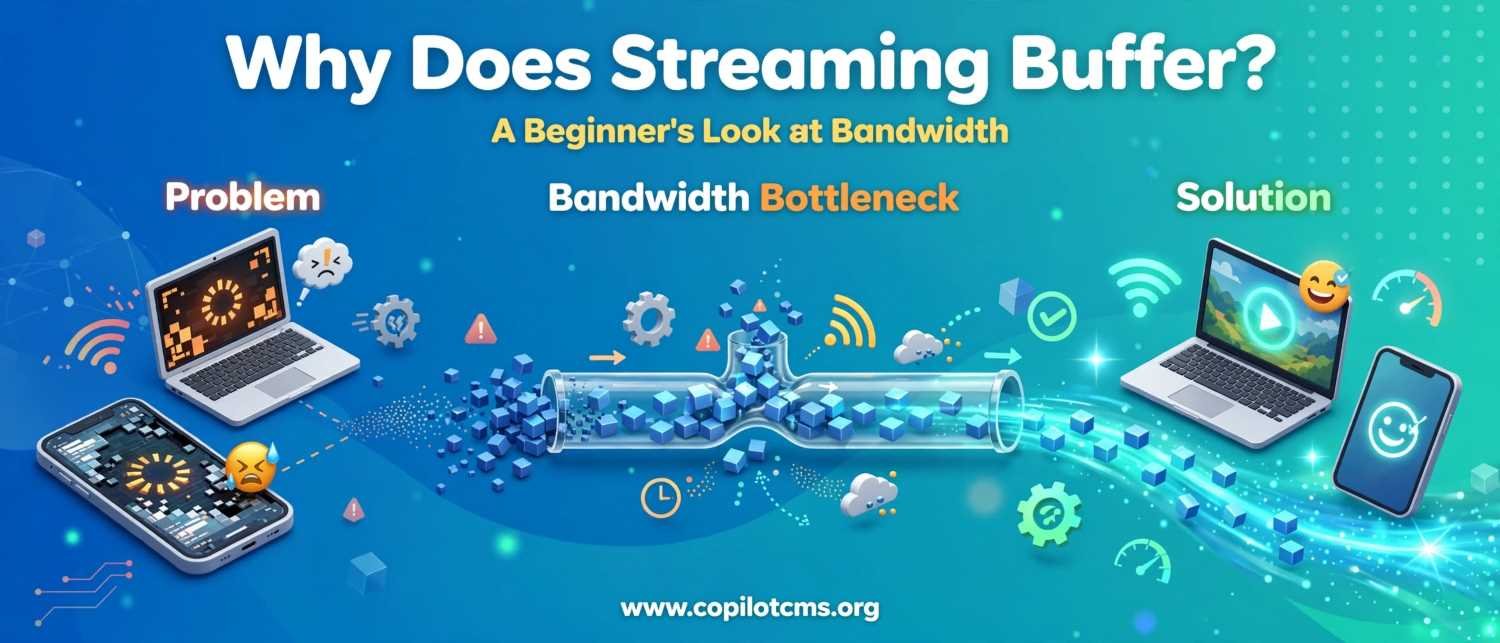
Think of your internet connection like a water pipe, and the video you're streaming like water filling up a bucket. As long as water flows into the bucket faster than it drains out (faster than you watch), everything runs smoothly. But if the pipe is too narrow, or something is blocking the flow, the bucket empties faster than it refills, and you're left standing there with nothing coming out. That's buffering: your "bucket" of video data ran dry.
So What Is Bandwidth, Exactly?
Bandwidth is simply how much data can travel through your internet connection at once. It's not about how fast a single piece of information travels, that's closer to what's called "latency." Bandwidth is about capacity, or how wide that water pipe is.
A Highway With Many Lanes
Imagine your internet connection as a highway. A low-bandwidth connection is like a narrow, single-lane road. Only a certain number of cars (data) can pass through per minute, no matter how fast each car is allowed to drive. A high-bandwidth connection is like a ten-lane superhighway, letting far more cars through at the same time. When you stream a high-definition video, you're essentially sending a lot more "cars" (data) down that road every second than you would with a lower-quality video.
Why Buffering Happens: The Usual Suspects
Buffering isn't random, it's almost always caused by one of a handful of common issues. Here are the biggest culprits:
1. Too Many Devices Sharing One Connection
If your household has several people streaming, gaming, or video calling at once, they're all sharing the same "highway." Just like rush hour traffic, too many cars trying to use the same road at the same time slows everyone down.
2. Weak Wi-Fi Signal
Wi-Fi is like a radio signal traveling through the air. Walls, distance from your router, and even microwaves or other electronics can weaken that signal, similar to how a radio station gets fuzzy the farther you drive from the broadcast tower.
3. Your Internet Plan Itself
Some internet plans simply come with a narrower "pipe" than others. If you're paying for a basic plan but trying to stream 4K video (which requires a lot of data flowing consistently), you may be asking for more than your plan can comfortably deliver.
4. Server-Side Congestion
Sometimes the problem isn't on your end at all. If millions of people are trying to watch the same new show at the same time, the streaming service's own servers can get overloaded, similar to a popular restaurant that's slammed on a Friday night and can't get food out fast enough, no matter how big your table is.
Why This Matters: What You Can Actually Do About It
Understanding the cause helps you find the right fix. Here's a simple troubleshooting checklist:
- Restart your router. This clears out small glitches, much like restarting a computer that's running slow.
- Move closer to your Wi-Fi router or connect via an ethernet cable for a more stable, direct connection.
- Pause other devices that are streaming, downloading, or gaming at the same time.
- Lower the video quality manually (most apps let you switch from 4K or HD down to a standard resolution) to reduce how much data you need per second.
- Check if it's the service, not you by trying a different app or website; if everything buffers, the issue is likely your connection, not the platform.
The Takeaway
Buffering isn't some mysterious glitch, it's simply your internet connection struggling to deliver data as fast as you're consuming it. Whether it's a crowded household network, a weak Wi-Fi signal, or an overloaded server on the other end, the underlying idea is always the same: not enough "water" flowing through the "pipe" fast enough to keep your bucket full. Once you understand bandwidth as capacity rather than speed, buffering stops feeling like bad luck and starts feeling like a solvable puzzle.
If you enjoyed this breakdown and want more clear, jargon-free explainers on how technology actually works, www.copilotcms.org regularly publishes quality content covering science and tech topics in a way that's approachable for curious readers of all backgrounds.