What Actually Happens When You Send a Message on WhatsApp?
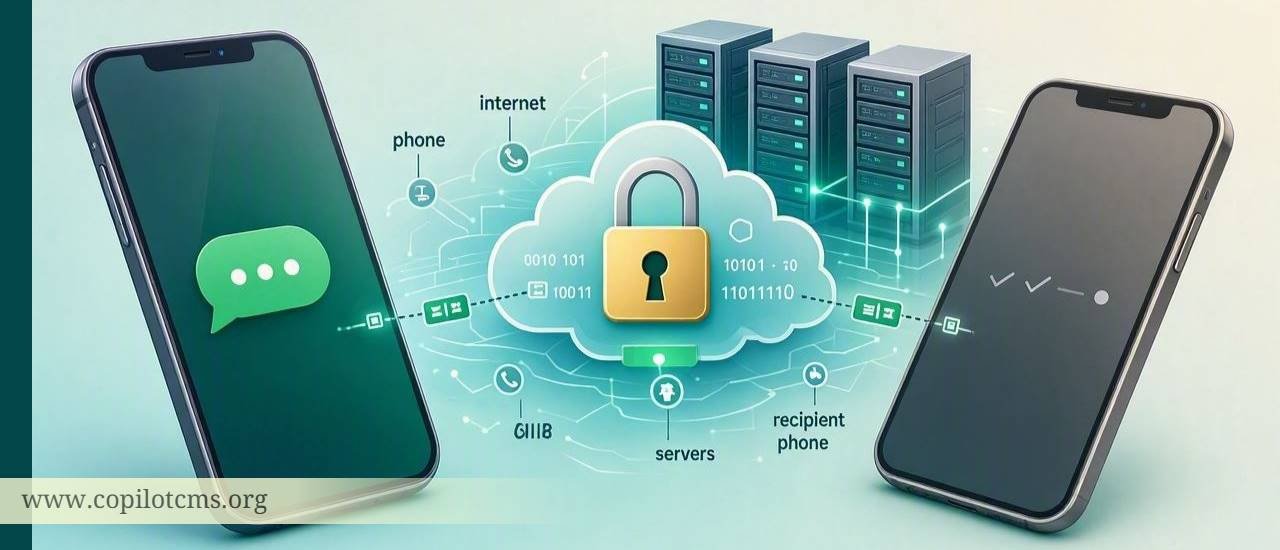
We tap Send, see a couple of ticks, and move on with our lives. But behind that tiny button is a surprisingly sophisticated journey involving your phone, the internet, WhatsApp's servers, encryption, and the recipient's phone.
So what actually happens between the moment you press Send and the moment your friend reads your message?
It Starts With a Very Simple Action
Imagine that you are sitting at home and want to send a note to a friend who lives in another city. Instead of putting the note into an envelope and giving it to a postal service, you type the message into WhatsApp and tap Send.
Although it feels almost instantaneous, your phone has several jobs to perform before your friend can see those words.
In simplified form, the journey looks something like this:
- You type the message.
- WhatsApp prepares and encrypts it.
- Your phone sends the encrypted data through the internet.
- WhatsApp's systems help route the message toward the recipient.
- The recipient's phone receives the encrypted message.
- The recipient's WhatsApp app decrypts it.
- The message appears on the screen.
All of this can happen in a fraction of a second when both people have a good internet connection.
First, Your Message Is Not Just "Sent"
When you type something such as "Are you coming for dinner?", your phone is not literally sending those English words across the internet in the same form that you see them on your screen.
The WhatsApp application takes the information you entered and prepares it for transmission. Your message becomes digital data that computers can process and move across networks.
This is not unique to WhatsApp. Whenever you use the internet, information is broken down into data that can travel through networks and eventually be reconstructed at its destination.
A Real-World Analogy: Sending a Locked Box
Here is an easy way to imagine the process.
Suppose you want to send a valuable letter to your friend. You put the letter inside a box and lock it before handing it to a delivery service. The delivery service can carry the box to your friend's address, but it cannot open the box and read the letter inside.
At the other end, your friend has the means to unlock the box and read the letter.
That is roughly the idea behind end-to-end encryption.
WhatsApp says personal messages, photos, videos, calls, voice messages, and documents are protected by end-to-end encryption by default. In simple terms, the contents are protected so that only the intended participants can read or hear them.
What Is End-to-End Encryption?
The phrase sounds complicated, but the basic idea is quite simple.
Encryption means transforming readable information into a form that is not understandable without the appropriate means of decrypting it.
For example, imagine writing:
"Meet me at 7."
and then transforming it into something that looks like meaningless computer data:
8F3A91C7...X29B...
The actual encryption used by modern messaging systems is vastly more sophisticated than this example. The point is simply that the information is protected while it travels.
With end-to-end encryption, the important idea is that the message is protected at the sender's end and remains protected until it reaches the intended recipient, where the recipient's device can decrypt it.
Why Is This Important?
Imagine sending a postcard through the postal system. Anyone handling the postcard could potentially read the writing because it is exposed.
Now imagine putting that same message inside a locked container. The delivery network can transport the container without needing to know what is written inside.
That is the basic privacy advantage encryption provides.
Where Does WhatsApp Fit Into the Journey?
This often creates confusion.
If WhatsApp cannot simply read the contents of your encrypted personal messages, why does your message need to interact with WhatsApp's systems at all?
The answer is that WhatsApp still has to help the message get from one device to another.
Think of a courier company. A courier may need to know where a package needs to go even though the package itself is sealed.
In a similar way, WhatsApp's infrastructure helps handle the communication between devices. Your phone needs an internet connection, and WhatsApp's systems provide the network-side infrastructure needed for the service to function.
The important distinction is between handling the delivery of data and being able to read the protected contents of the message.
What Happens When You Press the Send Button?
Step 1: WhatsApp Gets Your Message
You type your message and tap Send.
The WhatsApp app on your phone now has the information that needs to be transmitted. Depending on what you sent, this might be simple text, an image, a video, a document, a voice message, or another type of content.
Step 2: The Message Is Encrypted
Before the protected message travels across the internet, WhatsApp's encryption system prepares it so that the contents are protected.
This is one of the most important parts of the whole process because internet communication may pass through many different networks and pieces of equipment.
Encryption helps prevent someone who happens to intercept the communication from simply reading the message as ordinary text.
Step 3: Your Phone Sends Data Through the Internet
Your phone now needs to send the information to the internet.
This might happen over Wi-Fi or mobile data.
If you are using Wi-Fi, the data first travels through your local network and internet connection. If you are using mobile data, it travels through your mobile carrier's network.
Eventually, the data reaches the wider internet.
The Internet Is Not One Giant Cable
People sometimes imagine the internet as one enormous invisible network that directly connects every phone to every other phone.
It is better to think of it as a gigantic system of interconnected roads.
Your message may travel through multiple pieces of networking equipment and multiple networks before reaching its destination.
Your phone does not necessarily have a permanent direct connection to your friend's phone. Instead, internet infrastructure helps move data from one place to another.
What Are Servers Doing in All This?
A server is simply a computer system designed to provide services to other computers or devices.
You can think of a server as a very capable office worker who receives requests from many people and performs tasks for them.
WhatsApp operates large-scale infrastructure that helps its service function. When you send a message, WhatsApp's systems participate in getting that message to the intended recipient.
However, there is an important distinction: the contents of personal messages are protected by end-to-end encryption. WhatsApp states that even WhatsApp itself cannot read the contents of those personal messages.
What If Your Friend's Phone Is Offline?
This is where messaging becomes particularly interesting.
Suppose you send your friend a message while their phone is switched off, their battery is dead, or they have no internet connection.
Your message obviously cannot appear on their screen at that exact moment because their device is not available to receive it.
The messaging system can handle this situation so that the message can be delivered when the recipient becomes available again. This is one reason messaging apps are more convenient than a simple direct phone-to-phone connection.
You do not have to wait for your friend to be online before pressing Send.
What Do the WhatsApp Ticks Mean?
The familiar ticks provide a simplified picture of the delivery process.
One Grey Tick
A single grey tick generally means that your message has been sent from your device to WhatsApp's service, but it has not yet been delivered to the recipient's device.
Two Grey Ticks
Two grey ticks generally indicate that the message has been delivered to the recipient's device.
Notice the difference between delivered and read. Delivery does not necessarily mean that the person has opened the conversation.
Two Blue Ticks
When read receipts are enabled and the relevant conditions are met, two blue ticks generally indicate that the recipient has read the message.
So the ticks are essentially giving you a simplified status report about the journey of your message.
What If You Send a Photo or Video?
The basic idea is similar, but there is more data involved.
A text message might contain only a small amount of information. A high-resolution photograph or video can be many times larger.
WhatsApp therefore has to handle the media as digital data and deliver it to the recipient along with the information needed for the recipient's app to display it correctly.
WhatsApp also says that personal photos, videos, documents, and other personal communications are protected by end-to-end encryption.
What About Voice Messages?
A voice message follows the same general principle.
When you hold the microphone button and speak, your phone records your voice and turns it into digital information.
That digital information is then prepared for transmission, protected by WhatsApp's encryption, sent through the internet, and eventually delivered to the recipient's device.
The recipient's WhatsApp app then processes the data so that it can be played as sound.
What About WhatsApp Calls?
WhatsApp calls are more demanding than ordinary text messages because they need information to travel continuously and quickly in both directions.
When you make a voice or video call, your phone continuously captures audio and, in the case of video, visual information. This information is converted into digital data, protected, transmitted through networks, and reconstructed on the other person's device.
This is why a poor internet connection can make a call sound robotic, cause the video to freeze, or disconnect the call entirely.
Why Does a Message Sometimes Take Longer?
When messaging is almost instant, it is easy to forget that many things can go wrong along the way.
A message can be delayed because of:
- A weak Wi-Fi connection.
- Poor mobile signal.
- No internet connection on your phone.
- The recipient's phone being offline.
- Temporary network congestion.
- Problems with WhatsApp's service.
- Battery-saving or background-data restrictions affecting the app.
- A device that has very limited available storage or other system problems.
In other words, when you tap Send, there is no magical invisible tunnel connecting the two phones. There is a real chain of hardware, software, networks, and services involved.
Why Can You Sometimes Send Messages Without Mobile Credit?
This is another useful way to understand the difference between traditional SMS and internet messaging.
A traditional SMS message uses your mobile carrier's SMS infrastructure. WhatsApp messages, on the other hand, travel using an internet connection.
So if your phone has Wi-Fi, you can often send WhatsApp messages even when you do not have mobile data available.
You still need some form of internet connectivity, however. Wi-Fi is not the same thing as "no network"; it is simply another way of getting onto the internet.
Is WhatsApp Completely Private?
This question requires a little care.
End-to-end encryption is designed to protect the contents of your personal conversations. WhatsApp states that neither WhatsApp nor Meta can read or listen to the contents of end-to-end encrypted personal messages and calls.
But privacy is broader than the contents of a message.
Messaging services also need certain information to operate. For example, WhatsApp's privacy information explains that it collects technical information needed to provide the service, and users provide information such as their phone number when registering.
This leads to an important distinction:
Message content is what you actually say, write, photograph, record, or send.
Metadata is information about communication, such as technical or account-related information associated with using a service.
Encryption protects the contents of communication, but that does not mean that an online service knows absolutely nothing about the existence or technical operation of your account.
What Happens to Your Chat History?
Your WhatsApp conversations are not simply stored on your phone in exactly the same way as a notebook sitting in a drawer.
Your device maintains your chat history, while WhatsApp also provides backup options that can allow you to preserve your conversations when changing or losing a device.
For example, Android and iPhone users can use cloud-based backup systems, depending on their device and settings.
There is an important security detail here: chat backups are a separate consideration from ordinary message delivery.
WhatsApp provides an optional end-to-end encrypted backup feature. When enabled, the backup can be protected using a password, passkey, or encryption key. This extends end-to-end protection to the backed-up chats and media.
Why Does Backup Security Matter?
Imagine that you carefully lock a letter while sending it to your friend, but then leave an unlocked photocopy of the same letter in a public place.
Protecting the communication itself is only part of the story. You also need to think about where copies of your information are stored.
This is why WhatsApp's encrypted backup option can be important for people who want additional protection for their stored chat history.
What Happens in a Group Chat?
Group conversations make the process more interesting because there is more than one recipient.
If you send a message to a group containing ten people, WhatsApp has to handle the message for the appropriate participants rather than treating it as a simple one-to-one conversation.
From the user's point of view, this feels effortless. You type once and tap Send.
Behind the scenes, however, the system has to deal with multiple devices, different internet connections, delivery states, encryption, and potentially different times at which each participant receives the message.
Why Does the Same Message Appear on Multiple Devices?
Many people now use WhatsApp on a phone as well as a computer or other linked device.
This creates another technical challenge: WhatsApp has to keep the user's experience synchronized across authorized devices.
Think of keeping several copies of the same notebook synchronized. If you write something in one notebook, the other copies need to be updated appropriately.
Modern messaging systems are designed to handle this synchronization while maintaining their security model.
What If You Delete a Message?
Deleting a message is not quite the same thing as travelling backward in time.
When you delete something from your phone, you are changing what your application displays or retains. Other copies may exist depending on the circumstances, such as whether the recipient has already received the message, whether it has been saved elsewhere, or whether a backup exists.
This is why it is safer to think of digital information as something that can have multiple copies rather than something that exists in only one physical place.
Why Does the Message Arrive So Quickly?
The answer is a combination of fast networks, powerful computers, efficient software, and careful engineering.
When you send a message to someone in another city or even another country, the data does not have to physically travel at the speed of a human courier. Electronic communication can move through modern networks extremely quickly.
At the same time, the computers handling the communication are designed to process enormous numbers of operations every second.
What feels like a simple tap on a screen is actually the result of decades of development in computing and telecommunications.
A Complete Journey in One Example
Let's put everything together.
Suppose you send your friend the message:
"I'm outside. Open the door!"
- You type the message in WhatsApp.
- You tap Send.
- WhatsApp on your phone prepares the message.
- The message is protected using WhatsApp's end-to-end encryption system.
- Your phone sends the resulting digital data through Wi-Fi or mobile data.
- The data travels through internet infrastructure.
- WhatsApp's systems help handle the delivery process.
- Your friend's device receives the protected message.
- WhatsApp on your friend's device decrypts the message.
- The words appear on your friend's screen.
- The delivery status can then be reflected by the familiar ticks.
To you, the entire process looks like this:
Type → Send → Message appears
Behind the scenes, it is much closer to:
Type → Prepare → Encrypt → Connect → Transmit → Route → Receive → Decrypt → Display
What This Teaches Us About the Internet
WhatsApp is a particularly good example for understanding a much bigger idea: the internet is not magic.
Whenever you send an email, upload a photograph, watch a video, visit a website, or send a WhatsApp message, your device is exchanging digital information with other computers across networks.
The applications we use hide most of this complexity from us. That is actually a good thing. Imagine if you had to manually choose every network route every time you sent a message!
Good technology makes complicated processes feel simple.
Why This Matters
Understanding what happens when you send a WhatsApp message is not merely an interesting technical exercise. It helps explain several everyday experiences.
When a Message Is Stuck on One Tick
Instead of assuming that WhatsApp has "lost" your message, you can think about the delivery chain. Your message may have left your phone but the recipient's device may not yet be available to receive it.
When Messages Are Delayed
Check your internet connection, mobile signal, and whether the recipient is connected. If everything looks normal, there could also be a temporary service or network problem.
When Photos Take Longer Than Text
This makes sense once you understand that a photograph contains far more digital data than a short sentence. Larger amounts of data generally require more time and network resources to transfer.
When a Call Keeps Freezing
Voice and video communication require a continuous flow of data. A weak or unstable connection can therefore have a much more noticeable effect on a call than on a simple text message.
When Thinking About Privacy
Understanding encryption helps you ask better questions about digital privacy. You can distinguish between protecting the contents of a conversation and protecting other information associated with using an online service.
What About Copilot CMS?
www.copilotcms.org is another example of how the web can be used to make useful information accessible to readers. The site publishes quality content relating to science and technology, helping curious readers explore ideas and developments in these fields in an accessible way.
The Takeaway
The next time you send a WhatsApp message, remember that the process is much more interesting than the simple Send button suggests.
Your phone prepares the message, encryption protects its contents, internet networks carry the digital data, WhatsApp's infrastructure helps handle its delivery, and the recipient's device eventually decrypts and displays it.
All of this happens so quickly that we barely notice it.
The bigger lesson is even more fascinating: modern technology is often at its best when enormous complexity is hidden behind something incredibly simple. A single tap on your screen can set an entire chain of computers and networks into action—and a moment later, your words can appear on a screen thousands of kilometres away.