SQL Explained Without the Jargon
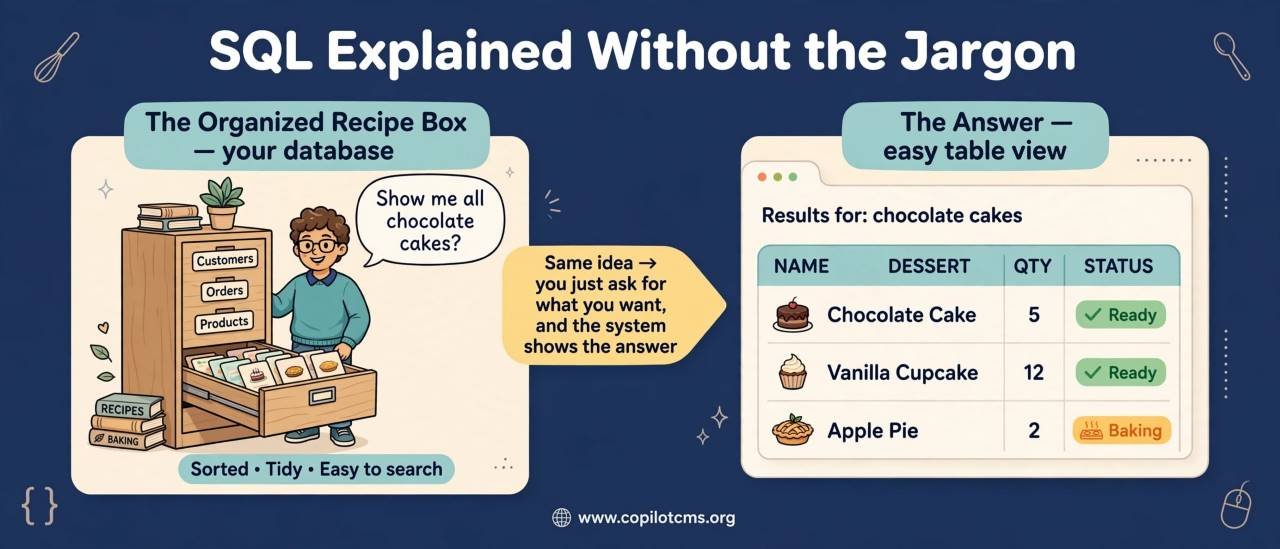
You may have heard the word SQL and assumed it was something only programmers understand. But at its heart, SQL is simply a way of asking a database to store, find, change, and organize information.
First: What Is a Database?
Before understanding SQL, it helps to understand the thing SQL talks to: a database.
Imagine a large library. Instead of books, this library stores pieces of information: customer names, product prices, orders, phone numbers, articles, passwords, and so on.
A database is like a highly organized digital filing system. It can contain millions or even billions of pieces of information while keeping them arranged so that a computer can find what it needs quickly.
For example, an online shop might have information like this:
- Customer names and email addresses
- Products and their prices
- Orders and their dates
- Which customer bought which product
- Available stock
You don't normally open the database and manually search through all of this information. Instead, software sends instructions to the database.
SQL is one of the main languages used to give those instructions.
So, What Exactly Is SQL?
SQL stands for Structured Query Language.
The name sounds more complicated than the idea behind it. SQL is a language designed for communicating with databases, especially databases that organize information into tables.
You can use SQL to say things such as:
- "Show me all customers."
- "Find the customer named Ahmed."
- "Show me products costing less than $50."
- "Add this new customer."
- "Change this customer's email address."
- "Delete this old record."
In other words, SQL lets you ask questions and give instructions to a database.
The Real-World Version: A Very Organized Filing Cabinet
Here's an easy way to imagine the whole thing.
Imagine that your office has a giant filing cabinet. Each drawer contains a different kind of information. One drawer contains customer records, another contains products, and another contains orders.
Each drawer contains carefully organized forms.
Now imagine that instead of opening the drawers yourself, you have a very fast librarian who understands a special language. You can tell the librarian:
"Give me the names of all customers who live in Lahore."
The librarian searches the appropriate files and gives you the answer.
In this analogy:
- The filing cabinet = the database
- The drawers = tables
- The forms = rows
- The information fields = columns
- The librarian = the database system
- Your instructions = SQL queries
That's the basic idea of SQL.
Tables: Where the Information Lives
Most beginners find SQL easier once they understand the idea of a table.
A database table looks somewhat like a spreadsheet.
Suppose an application has a table called customers:
| id | name | city | |
|---|---|---|---|
| 1 | Ahmed | Lahore | ahmed@example.com |
| 2 | Fatima | Karachi | fatima@example.com |
| 3 | Bilal | Lahore | bilal@example.com |
The table has columns and rows.
Columns
A column describes one type of information.
In the example above, name, city, and email are columns.
Think of a column as a question on a paper form:
"What is the customer's name?"
Rows
A row represents one complete record.
For example, the row containing Ahmed's information represents one customer.
You can think of a row as one person's completed form.
Your First SQL Query
One of the most common SQL commands is SELECT.
It means, roughly, "give me this information."
For example:
SELECT name FROM customers;This tells the database:
"Give me the name column from the customers table."
The database might return:
- Ahmed
- Fatima
- Bilal
You can ask for more than one column:
SELECT name, email FROM customers;Now you're asking for both the customer's name and email address.
What Does the Asterisk (*) Mean?
You will frequently see this:
SELECT * FROM customers;The * means "all columns."
So this query essentially says:
"Show me everything in the customers table."
It's convenient when you're learning or inspecting data, although applications often request only the columns they actually need.
Finding Specific Information with WHERE
What if you don't want every customer?
Suppose you want only customers from Lahore.
SELECT name FROM customers
WHERE city = 'Lahore';
The WHERE part adds a condition.
It's like telling our imaginary librarian:
"Look through the customer files, but only give me people whose city is Lahore."
The result would contain Ahmed and Bilal, but not Fatima.
SQL Can Use Different Conditions
You can use SQL to ask many kinds of questions.
Numbers
Suppose you have a products table with a price column.
SELECT name, price FROM products
WHERE price < 50;
This asks for products costing less than 50.
You can also use operators such as:
=means equal to<means less than>means greater than<=means less than or equal to>=means greater than or equal to<>means not equal to
AND
You can combine conditions with AND.
SELECT * FROM products
WHERE price < 50
AND category = 'Books';
This means the product must satisfy both conditions.
OR
OR means either condition can be true.
SELECT * FROM customers
WHERE city = 'Lahore'
OR city = 'Karachi';
This finds customers in either Lahore or Karachi.
Sorting Results with ORDER BY
Finding information is useful, but sometimes you want it arranged in a particular order.
That's where ORDER BY comes in.
SELECT name, price FROM products
ORDER BY price;
This sorts the results by price, normally from smallest to largest.
To reverse the order, you can use DESC:
SELECT name, price FROM products
ORDER BY price DESC;
Now the most expensive products appear first.
ASC means ascending, while DESC means descending.
Limiting the Number of Results
Imagine a database containing ten million products. You probably don't want all ten million returned just because you asked for products sorted by price.
You can limit the results.
SELECT * FROM products
ORDER BY price DESC
LIMIT 10;
This asks for the ten most expensive products.
The exact syntax for limiting results can vary between database systems, but the general idea is simple: don't give me everything; give me only a certain number of results.
Adding New Information with INSERT
SQL isn't only for reading information. You can also add information.
The INSERT command is used for this.
INSERT INTO customers (name, city, email)
VALUES ('Sara', 'Islamabad', 'sara@example.com');
This is essentially saying:
"Create a new customer record with these values."
Think of it as filling out a new form and putting it into the filing cabinet.
Changing Existing Information with UPDATE
Suppose Sara moves from Islamabad to Rawalpindi.
You can change her record with UPDATE:
UPDATE customers
SET city = 'Rawalpindi'
WHERE email = 'sara@example.com';
The SET part says what should change.
The WHERE part says which record should change.
This distinction is extremely important.
Why WHERE Is So Important
Consider this command:
UPDATE customers
SET city = 'Rawalpindi';
Notice what's missing?
There is no WHERE condition.
That can mean: change the city for every customer.
That's why programmers treat commands such as UPDATE and DELETE with care.
In our filing-cabinet analogy, it would be like telling the librarian:
"Change everyone's address."
That's very different from saying:
"Change the address on this one particular person's form."
Deleting Information with DELETE
The DELETE command removes records.
DELETE FROM customers
WHERE email = 'sara@example.com';
This tells the database to remove the customer matching that condition.
Again, the WHERE condition matters enormously.
A careless delete command can remove many records at once, so real applications generally use safeguards, permissions, backups, and other protections around destructive operations.
Databases Usually Have More Than One Table
Real applications rarely put everything into one enormous table.
An online shop might have separate tables for:
customersproductsordersorder_items
Why separate them?
Imagine a real shop. You wouldn't write every customer's complete information on every invoice they ever received. That would create enormous amounts of unnecessary repetition.
Instead, you keep customer information in one place and order information somewhere else, then connect them when necessary.
How Tables Connect
This is where one of SQL's most useful ideas appears: the JOIN.
Suppose the customers table contains:
| id | name |
|---|---|
| 1 | Ahmed |
| 2 | Fatima |
And an orders table contains:
| id | customer_id | product |
|---|---|---|
| 101 | 1 | Laptop |
| 102 | 2 | Keyboard |
The customer_id connects an order to a customer.
SQL can combine these tables:
SELECT customers.name, orders.product
FROM customers
JOIN orders
ON customers.id = orders.customer_id;
The result might look like:
| name | product |
|---|---|
| Ahmed | Laptop |
| Fatima | Keyboard |
The database has effectively connected two sets of information using a shared piece of information.
The Real-World Version of a JOIN
Imagine a school office.
One filing cabinet contains student records. Another contains exam results.
The student cabinet has:
- Student ID
- Name
- Class
The exam cabinet has:
- Student ID
- Subject
- Score
You could ask the clerk:
"Find the students' names and their mathematics scores."
The clerk uses the Student ID to match the records in the two cabinets.
That's essentially what a database JOIN does.
What Is a Primary Key?
You'll often see a column called id in database tables.
This is frequently used as a primary key.
A primary key is a value that uniquely identifies a row.
Think of it like an identification number on an official document.
Two customers might both be named Ahmed. Their names aren't necessarily unique. But each customer can have a different ID:
- Customer 1001
- Customer 1002
This gives the database a reliable way to distinguish between them.
What Is a Foreign Key?
A foreign key is commonly used to connect one table to another.
Remember the customer_id in the orders table?
That value can refer to the customer's id in the customers table.
It's like writing a reference number on one document that points to another document in the filing cabinet.
SQL Can Count Things
SQL can do more than retrieve individual records. It can also calculate information.
For example:
SELECT COUNT(*) FROM customers;This asks:
"How many customer records are there?"
Other common functions include:
COUNT()— counts recordsSUM()— adds numbers togetherAVG()— calculates an averageMIN()— finds the smallest valueMAX()— finds the largest value
For example:
SELECT AVG(price) FROM products;This asks for the average product price.
Grouping Information
SQL can also group records together.
Suppose you want to know how many customers live in each city.
SELECT city, COUNT(*)
FROM customers
GROUP BY city;
Instead of looking at every customer individually, the database groups customers by city and counts each group.
You can think of this as sorting hundreds of pieces of paper into piles labeled Lahore, Karachi, Islamabad, and so on, and then counting the papers in each pile.
What Is a Query?
You will hear the word query constantly when learning SQL.
A query is simply a request or instruction sent to the database.
For example:
SELECT name FROM customers
WHERE city = 'Lahore';
That's a SQL query.
Not every SQL statement is technically a question. Some statements change data or database structures. But "query" is commonly used when talking about interacting with a database.
SQL Is Not the Database
This is an important distinction for beginners.
SQL is a language. A database system is software that understands and executes that language.
Think about it like this:
- English is a language.
- A person can understand English.
- SQL is a language.
- A database management system can understand SQL.
Popular database systems include MySQL, PostgreSQL, Microsoft SQL Server, SQLite, and Oracle Database.
They all work with SQL, although they don't always implement every feature in exactly the same way.
Where Does SQL Fit Into a Website?
This is where SQL becomes especially interesting.
Imagine you visit an online shop and search for "headphones."
Your browser sends your request to the website's server.
The server's application may then ask the database for matching products.
The database searches its stored information and sends results back to the application.
The application then turns those results into the webpage you see.
The simplified journey looks something like this:
- You search for something.
- Your browser sends the request to the website.
- The website's application processes the request.
- The application sends a database query.
- The database finds the relevant information.
- The database sends the results back.
- The application prepares the webpage.
- Your browser displays it.
So when you see a list of products, news articles, social-media posts, or account information on a website, there's a good chance a database is involved somewhere behind the scenes.
SQL and Your Blog
For a content website, SQL can be particularly useful.
Imagine your blog has hundreds or thousands of articles. Instead of creating a completely separate webpage file for every article, the application can store article information in a database.
A table might contain columns such as:
- Article ID
- Title
- Article content
- Author
- Publication date
- Category
- Status
When a visitor opens an article, the application can use its ID to retrieve the appropriate record from the database.
That's one reason databases are so important to modern websites.
Why SQL Is So Powerful
The impressive part isn't that SQL can find one name in a table. The real power appears when you have enormous amounts of information.
Imagine a spreadsheet containing ten rows. Finding something manually isn't difficult.
Now imagine the same spreadsheet containing ten million rows.
Manually searching would be a nightmare.
A properly designed database can use structures called indexes to find information much more efficiently.
Indexes: The Book's Table of Contents
Suppose you want to find the word "computer" in a 1,000-page book.
You could start at page one and read every page until you find it.
Or you could use the index at the back of the book.
A database index works on a similar principle.
Instead of scanning every record unnecessarily, the database can use an index to locate relevant records more efficiently.
This is one reason database design matters. A badly designed database can become painfully slow as the amount of information grows.
Is SQL Difficult to Learn?
The basic syntax of SQL is surprisingly approachable.
Many SQL commands almost resemble ordinary English:
SELECT name
FROM customers
WHERE city = 'Lahore';
You can almost read this as:
"Select the name from customers where the city is Lahore."
The difficult part comes later, when queries become more complex and you need to understand how tables relate to one another, how databases are designed, how indexes work, and how to write efficient and safe queries.
But you don't need to understand all of that to begin.
Common SQL Words Without the Jargon
Here is a quick translation of some terms you're likely to encounter:
| SQL term | Plain-English meaning |
|---|---|
| Database | A structured collection of information |
| Table | A structured set of related information |
| Row | One record |
| Column | One type of information about a record |
| Query | A request or instruction for the database |
| SELECT | Retrieve information |
| INSERT | Add information |
| UPDATE | Change existing information |
| DELETE | Remove information |
| WHERE | Specify which records you're interested in |
| JOIN | Combine related information from tables |
| INDEX | A structure that can help the database find information faster |
| Primary key | A unique identifier for a record |
| Foreign key | A value used to connect related records between tables |
Why SQL Matters
You might be wondering: if applications can do all this automatically, why should anyone care about SQL?
Because databases are everywhere.
Online stores use them for products and orders. Banks use them for financial records. Hospitals use them for information management. Universities use them for students and courses. Social networks use them for enormous collections of user and content data. Websites use them to store articles, accounts, comments, settings, and much more.
Whenever an application needs to remember and retrieve large amounts of structured information, some kind of data-storage system is usually involved.
Understanding SQL therefore gives you a glimpse into what is happening behind the screen.
Why This Matters When Building Websites
If you're building a website with a database, SQL sits somewhere between your application and your stored information.
For example, a PHP application might receive a request such as:
"Show article number 42."
The PHP code can construct a database query asking for that article. The database returns the record, and PHP uses the information to create the webpage.
This is why learning SQL is useful even if your main interest is PHP, Python, JavaScript, or another programming language.
A Very Important Security Issue: SQL Injection
There is one SQL-related security concept every beginner working with websites should eventually understand: SQL injection.
Imagine a website takes text entered by a visitor and carelessly combines that text directly into a SQL command.
A malicious visitor may deliberately enter specially crafted text that changes what the database command means.
Instead of simply asking:
"Find this article."
the attacker may attempt to manipulate the application's database query into doing something the developer never intended.
This is why modern applications should use techniques such as parameterized queries or prepared statements when handling user-supplied values.
The important beginner lesson is simple:
Never assume that text entered by a visitor is automatically safe to put directly into a SQL command.
Common Beginner Mistakes
Forgetting the WHERE Clause
This is one of the most dangerous mistakes when changing or deleting data.
UPDATE customers
SET city = 'Lahore';
Without a condition, this may update every customer.
Misspelling a Table or Column
If you write:
SELECT username FROM customers;but the actual column is called user_name, the database may report an error.
SQL is not guessing what you meant. The names must match the database structure.
Forgetting Quotes Around Text
Text values are normally written in quotes:
WHERE city = 'Lahore'Numbers are normally written without quotes:
WHERE age = 25The exact rules can vary depending on the database system and data type, but this is a useful starting point.
Expecting SQL to Fix Bad Data
SQL can retrieve and manipulate information, but it cannot magically make poorly designed or inconsistent data good.
If one record says Lahore, another says lahore, and another says LHR, a simple search for Lahore may not find all three.
Good database design and good data practices matter just as much as knowing SQL syntax.
Do You Need to Memorize SQL?
Not really.
Experienced developers frequently look up SQL syntax. There are many commands, functions, database-specific features, and edge cases.
What's more important at the beginning is understanding the underlying ideas:
- Information is organized into tables.
- Rows represent records.
- Columns describe the records.
- Queries retrieve or manipulate information.
- Conditions determine which records are affected.
- Tables can be connected.
- Indexes can make searching faster.
- Careless queries can damage or expose data.
Once those ideas make sense, the syntax becomes much easier to learn.
A Tiny SQL Cheat Sheet
Here are some of the commands worth recognizing when you first encounter SQL:
-- Read data
SELECT * FROM customers;

-- Find specific data
SELECT name FROM customers
WHERE city = 'Lahore';

-- Sort data
SELECT * FROM products
ORDER BY price DESC;

-- Add data
INSERT INTO customers (name, city)
VALUES ('Ali', 'Lahore');

-- Change data
UPDATE customers
SET city = 'Karachi'
WHERE id = 5;

-- Delete data
DELETE FROM customers
WHERE id = 5;
You don't have to master all of these immediately. The goal is simply to recognize what each one is trying to do.
How to Start Learning SQL
A good beginner path is to start small rather than trying to understand an entire database system at once.
- Learn what databases, tables, rows, and columns are.
- Practice simple
SELECTqueries. - Learn
WHEREand conditions. - Practice sorting with
ORDER BY. - Learn how to add, update, and delete records.
- Understand primary and foreign keys.
- Learn
JOINoperations. - Explore counting, grouping, and other functions.
- Learn about indexes and database design.
- Learn how applications safely communicate with databases.
Once you can look at a SQL statement and explain what it is asking the database to do, you've already crossed an important first hurdle.
The Takeaway
SQL sounds technical because it belongs to the world of databases, but the basic idea is surprisingly ordinary: SQL is a language for asking a database to work with information.
Think of a database as an enormous, perfectly organized filing system. Tables are the cabinets, rows are the individual records, columns describe those records, and SQL is the language you use to tell the filing clerk what you need.
Once you understand that picture, commands such as SELECT, INSERT, UPDATE, DELETE, and JOIN stop looking like mysterious computer jargon. They're simply different ways of saying: find this, add that, change this, remove that, or connect these pieces of information.