What's Actually Inside Your Computer? A Tour for People Who've Never Opened One
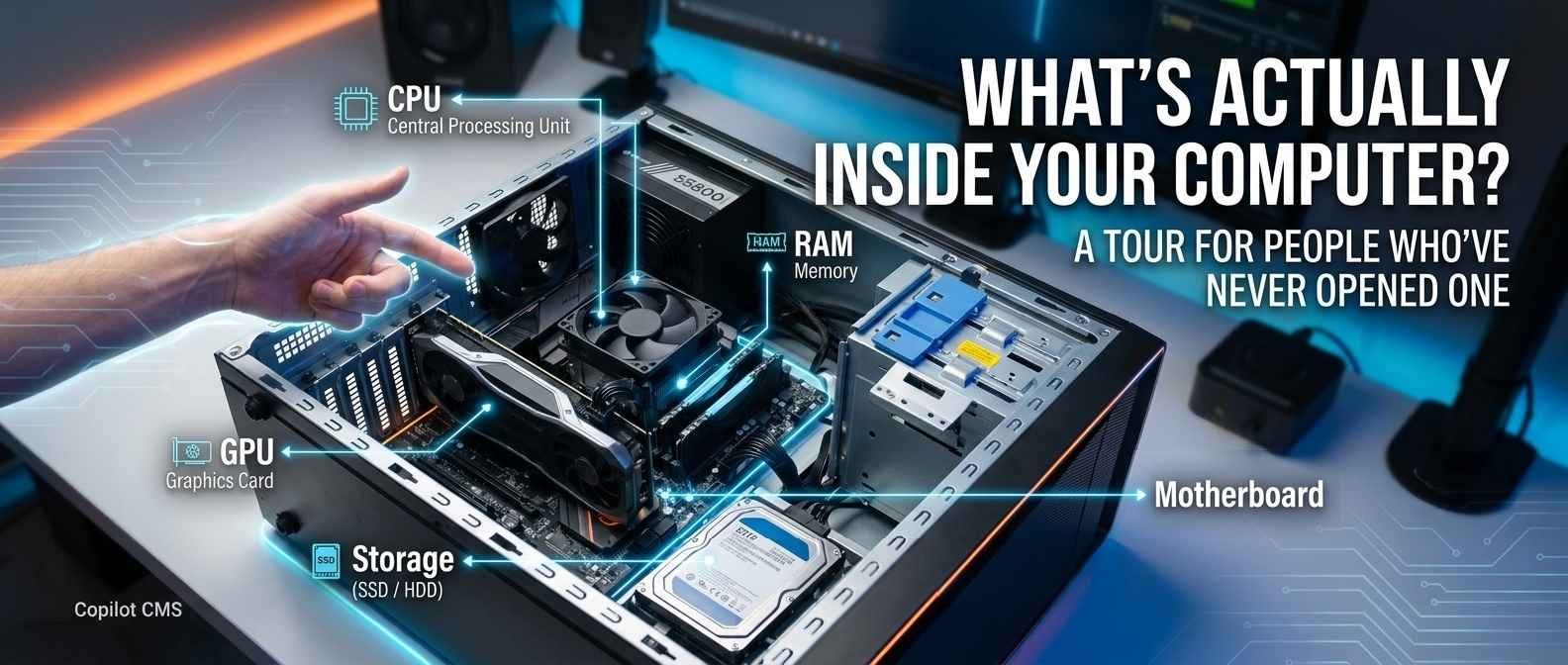
You use it every day, but if someone popped the side panel off and asked you to point to the "brain," would you know where to look? Let's take a guided tour.
Most of us treat our computers like sealed boxes — you press the power button, things happen, and whatever's inside stays a mystery. But the inside of a computer isn't actually that mysterious once someone walks you through it. It's a small collection of specialized parts, each with one clear job, all working together like a tiny, well-organized team.
Let's open the hood — figuratively — and meet the main characters.
The Motherboard: The Foundation Everything Sits On
If you opened a computer case, the biggest flat piece you'd see — the one everything else plugs into — is the motherboard. Think of it as the foundation of a house, or the skeleton of the whole system. It doesn't really do the computing itself, but it provides the wiring and connection points that let every other component talk to each other.
Every other part we're about to cover either plugs directly into the motherboard, or connects to it through a cable. Without it, you'd just have a pile of disconnected parts with no way to communicate.
The CPU: The Brain
The CPU (Central Processing Unit) is the closest thing a computer has to a brain. It's usually a small, surprisingly unimpressive-looking square chip — often smaller than a matchbox — sitting in the middle of the motherboard, typically hidden under a cooling fan or metal block.
Despite its small size, the CPU is doing an enormous amount of work: it's the part actually performing calculations and following instructions — from running your operating system, to opening an app, to calculating what should appear on your screen. Every single thing your computer "thinks about" runs through the CPU in some form.
Because it works so hard, the CPU also generates a lot of heat, which is why it's almost always covered with some kind of cooling setup — either a fan, or in higher-end systems, a liquid cooling loop.
RAM: The Short-Term Memory
RAM (Random Access Memory) usually looks like one or two long, thin sticks plugged into slots near the CPU. RAM is best understood as your computer's short-term memory — the stuff it's actively working with right now.
Here's a useful analogy: if your computer's storage (which we'll get to next) is like a filing cabinet full of documents, RAM is like the surface of your desk. When you want to work on a document, you don't leave it in the cabinet — you pull it out and put it on your desk where it's quick to access. The bigger your desk (more RAM), the more documents (programs and tabs) you can have open and ready to use at once without things slowing down.
Crucially, RAM is temporary. The moment you turn your computer off, everything sitting in RAM disappears — which is exactly why you lose unsaved work when your computer crashes or loses power. It's not designed for permanent storage; it's designed for speed.
Storage: The Long-Term Memory
While RAM handles short-term, active memory, storage — either a Hard Disk Drive (HDD) or, more commonly in modern computers, a Solid-State Drive (SSD) — is where everything lives permanently: your operating system, your apps, your photos, your documents. This is the "filing cabinet" from our analogy above.
Unlike RAM, storage keeps its contents even when the power is off — that's the entire point. When you save a file, you're telling the computer to move it from short-term memory (RAM) into long-term storage, so it'll still be there the next time you turn the computer on.
SSDs have largely replaced older spinning hard drives because they have no moving parts — data is stored electronically rather than on a physically spinning magnetic disc — which makes them significantly faster and more durable.
The GPU: The Visual Specialist
The GPU (Graphics Processing Unit) specializes in one particular kind of task: rendering images, video, and anything visually complex, especially the fast, detailed graphics used in gaming or video editing.
Some computers have this built directly into the same chip as the CPU (called "integrated graphics") — fine for everyday tasks like browsing and word processing. Others have a separate, dedicated GPU card, often the largest single component inside a desktop computer, reserved for more demanding visual work.
The difference between a CPU and GPU comes down to how they work: a CPU is built to handle a wide variety of tasks one after another very quickly, while a GPU is built to handle a massive number of simpler, repetitive calculations all at once — which happens to be exactly what rendering millions of pixels requires.
The Power Supply Unit (PSU): The Heart
Somewhere in a desktop computer, usually tucked in a corner, is the Power Supply Unit — a metal box that takes the electricity coming from your wall outlet and converts it into the specific type and amount of power each component actually needs. Different parts require different voltages, and the PSU is responsible for distributing the right amount to each one, reliably and safely.
Cooling: Fans, Heat Sinks, and Airflow
Nearly every component we've covered generates heat while it works, and too much heat can damage or slow down a computer. That's why you'll typically find one or more fans inside a computer case, along with metal heat sinks (ridged metal blocks designed to absorb and disperse heat) attached to the hottest components, especially the CPU and GPU.
This is also why blocking a laptop's air vents — say, using it on a soft pillow or blanket — can cause it to slow down or overheat: you're literally cutting off its ability to breathe.
Putting It All Together
Here's a simple way to picture the whole system working together, using an everyday scenario — say, opening a photo editing app:
- You click the app icon, and the CPU starts processing that instruction.
- The app's files get pulled from storage and loaded into RAM so they're quickly accessible.
- As you edit the photo, the GPU helps render the image and any visual effects on screen.
- The motherboard is quietly relaying signals between all of these parts the entire time.
- The PSU is feeding all of them the electricity they need to function.
- Fans and heat sinks are working in the background to keep everything from overheating.
- When you hit save, the finished file gets written from RAM back into permanent storage.
None of these parts is doing anything magical on its own — it's the coordination between all of them, happening constantly and at incredible speed, that makes "using a computer" feel effortless.
The Takeaway
Your computer isn't one mysterious black box — it's a small team of specialists, each handling one job well: a brain that thinks (CPU), a desk for active work (RAM), a filing cabinet for permanent storage, a visual specialist (GPU), a foundation connecting them all (the motherboard), a heart pumping power (the PSU), and a cooling system keeping everyone comfortable enough to keep working. Once you know what each piece does, the inside of a computer stops looking like a tangle of mysterious parts — and starts looking like a surprisingly logical little machine.