How Does Google Know What You’re Looking For?
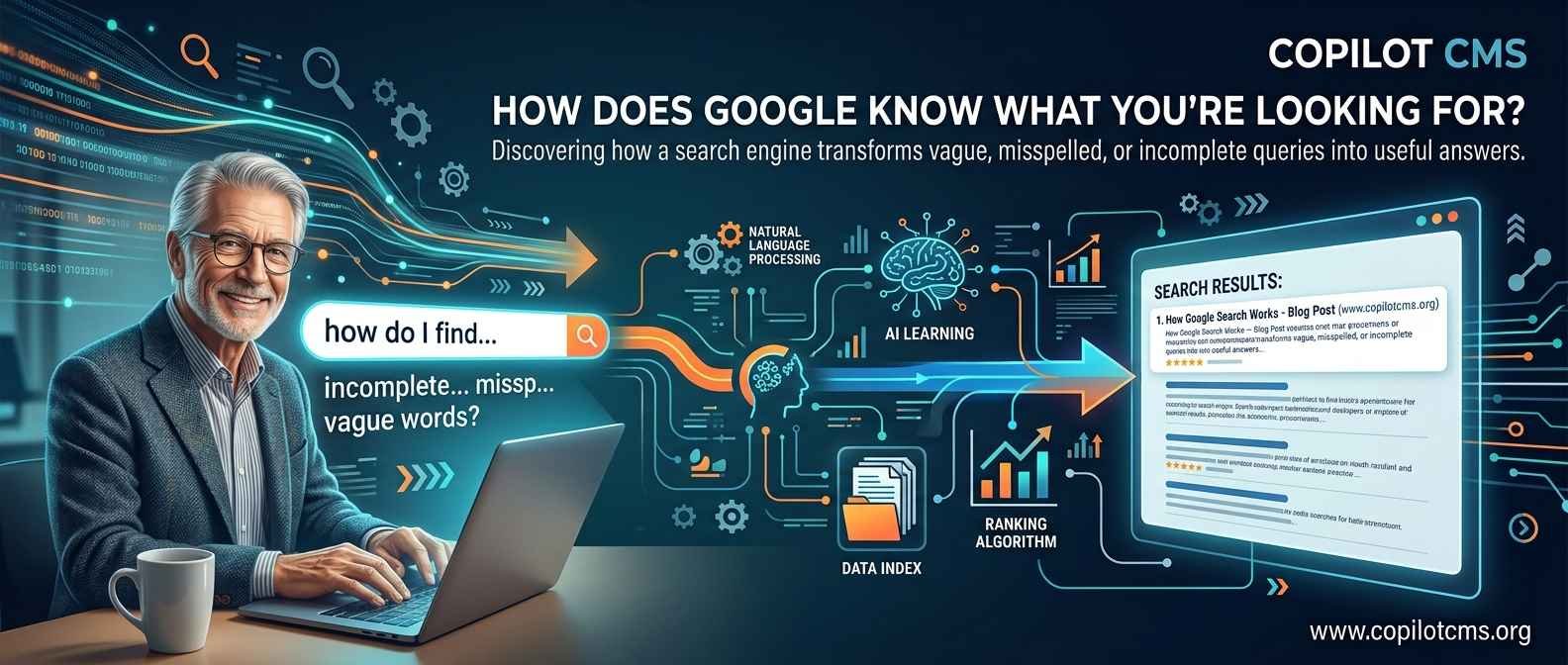
When you type a few words into Google, it can often guess what you mean—even when your question is incomplete, misspelled, or surprisingly vague. So how does a search engine turn those few words into a useful list of answers?
Google Is Not Really “Reading Your Mind”
It can certainly feel that way. You might type something like “best time to visit Turkey”, and within a fraction of a second Google presents pages about weather, seasons, prices, holidays, and popular destinations.
But Google does not actually know what you are thinking. Instead, it makes an educated guess about your search intent—the thing you are probably trying to accomplish when you type your query.
It does this by combining several kinds of information: the words you typed, the relationships between those words, the meaning behind the query, the information Google has collected about web pages, and sometimes useful context such as your approximate location, language, or previous search activity.
The important point is this: Google is trying to understand your question, not merely match your words.
First, What Happens When You Search?
Imagine that you open Google and type:
“weather Lahore tomorrow”
Google has to perform several jobs almost instantly.
- It identifies what the words probably mean.
- It determines what kind of information you are looking for.
- It searches its enormous collection of information for relevant results.
- It compares those possible results using many different signals.
- It presents what it believes are the most useful answers first.
All of this happens so quickly that the process can appear almost magical.
The Real-World Version: Asking a Very Knowledgeable Librarian
A useful way to understand Google is to imagine a gigantic library containing billions of books, magazines, newspapers, maps, photographs, and documents.
Now imagine walking into that library and asking a librarian:
“I need something about learning photography.”
The librarian would not simply look for a book with exactly those three words on its cover. They would probably ask themselves:
- Does this person want to learn photography from the beginning?
- Are they looking for a course?
- Do they want a camera recommendation?
- Are they interested in taking better photographs?
- Could they be looking for photography books?
Google performs a similar kind of reasoning at enormous scale. It looks at the words you entered and tries to determine what information would actually satisfy your request.
The difference is that Google's “library” contains information from an enormous portion of the publicly accessible web, and its automated systems can process your request extremely quickly.
Step 1: Google Has to Understand Your Words
Before Google can find useful information, it needs to understand the query.
Consider this search:
“how to fix phone screen”
Google does not treat this as four completely unrelated words. It recognizes that the words form a meaningful request. The word “fix” suggests a problem, “phone screen” identifies the object involved, and “how to” suggests that the user wants instructions.
That gives Google an important clue about the type of results that may be useful.
Words Can Have More Than One Meaning
Language is complicated because the same word can mean different things in different situations.
For example, consider the word “apple.”
You might be searching for the fruit. Or you might be searching for the technology company. Google has to examine the surrounding words to figure out which meaning is more likely.
Compare:
- “apple nutrition” — probably the fruit
- “Apple iPhone” — probably the technology company
- “Apple stock price” — almost certainly the company
This is one reason search engines have become much better at understanding natural language. The surrounding words provide context.
Google Looks at the Meaning, Not Just Exact Words
Suppose you search for:
“places to eat near me”
A useful search engine should not require a restaurant's web page to contain that exact sentence.
Instead, it can understand that you are probably looking for restaurants or other places where you can get food, and that location is important to your request.
This is an example of semantic understanding. “Semantic” simply means related to meaning.
In everyday language, Google is asking:
“What does this person mean by these words?”
Why Google Sometimes Corrects Your Spelling
Have you ever typed something incorrectly and seen Google say:
“Did you mean …?”
This happens because Google has learned that people often make spelling mistakes, use different spellings, or accidentally leave out letters.
For example, if someone searches for:
“resturant near me”
Google can recognize that “resturant” is probably a misspelling of “restaurant.”
It can then search for results related to the likely intended word instead of treating the misspelling as an entirely different subject.
This is another example of Google trying to understand what you intended, rather than blindly processing exactly what you typed.
Step 2: Google Already Knows About Web Pages
Google cannot instantly read the entire internet every time you perform a search. Instead, it has already discovered and processed huge numbers of web pages.
This involves three important ideas: crawling, indexing, and ranking.
Crawling: Discovering Pages
Google uses automated programs, commonly called crawlers or Googlebot, to discover web pages and follow links from one page to another.
Think of a crawler as a very fast librarian walking through an enormous library, discovering new books and recording what each book contains.
When a website publishes a new page, Google may eventually discover it through links, sitemaps, or other signals.
Indexing: Organizing What Was Discovered
Finding a page is only the beginning. Google also needs to process and organize information from that page so it can retrieve it efficiently later.
This organized collection is called an index.
You can think of an index as the catalog system in a library. Instead of opening every book whenever somebody asks a question, the librarian can consult the catalog and quickly locate potentially useful books.
Google's index is vastly more complicated than an ordinary library catalog. It can contain information about the words and topics associated with pages, links, images, videos, and many other characteristics.
Ranking: Choosing What Comes First
Once Google understands your query and finds potentially relevant pages, it has another difficult problem:
Which results should appear first?
There may be thousands or millions of pages that are somehow related to your search.
Google therefore uses automated ranking systems to determine which results are likely to be most useful for that particular query.
Relevance Is More Than Having the Right Keywords
In the early days of search engines, simply matching words was much more important. Modern search is considerably more sophisticated.
Suppose you search:
“how does a refrigerator work”
A page that merely repeats the words “refrigerator” and “work” hundreds of times is not necessarily useful.
Google can consider whether the page actually discusses refrigeration, whether the information appears relevant to the question, and many other signals that help determine its usefulness.
This is why modern search engine optimization is not simply about repeating keywords. A page needs to provide genuinely useful information that matches what people are trying to find.
Google Tries to Understand Search Intent
One of the most important ideas in modern search is search intent.
Search intent is simply the purpose behind a search.
Consider the query:
“Java”
What does the person want?
They might mean:
- the Java programming language,
- the Indonesian island of Java,
- Java coffee,
- or something else.
Now compare it with:
“Java programming tutorial for beginners”
The intent is much clearer.
Google can use the additional words to narrow down what the person probably wants.
Informational Searches
Sometimes you simply want information.
Examples include:
- “How does Wi-Fi work?”
- “What is photosynthesis?”
- “Who wrote Pride and Prejudice?”
These searches generally indicate that the user wants an explanation or factual information.
Navigation Searches
Sometimes you already know where you want to go.
For example:
- “Facebook”
- “YouTube”
- “Wikipedia”
In these cases, the search engine can often understand that you are trying to reach a particular website or service.
Transactional Searches
Sometimes you want to take an action, such as buying something.
For example:
- “buy wireless keyboard”
- “best laptop under $500”
- “book hotel in Lahore”
The words in these searches provide clues that the person may be interested in products, services, prices, or bookings.
How Does Google Know What “Near Me” Means?
Consider a search such as:
“pizza near me”
The words alone do not tell Google which city you mean.
To provide useful local results, Google can use location-related signals available to it, depending on the device, settings, and circumstances. Your search may therefore produce restaurants close to your current location rather than restaurants on the other side of the world.
This is why the same search can produce different results for two people in different cities.
Location is only one possible contextual signal. Google may also consider factors such as language and the nature of the query.
Does Google Remember Everything You Search?
This is an important distinction.
Google has systems that can use information associated with your Google activity to personalize certain experiences when personalization is enabled and applicable. But this does not mean that Google has a perfect record of every thought you have ever had or that every search result is individually hand-picked by a human.
Search results can be influenced by many different factors, and personalization is only one part of the larger system.
You can also control various aspects of your Google account activity and personalization through Google's privacy and activity settings.
Why Do Two People Sometimes Get Different Results?
Imagine two people asking the same question in a physical library.
One person is standing in Lahore and the other is standing in London. If they ask, “Where can I get a good cup of coffee?”, a helpful librarian would probably give them completely different answers.
Search engines can similarly produce different results because of factors such as:
- location,
- language,
- the exact wording of the query,
- device and search context,
- freshness of information,
- and, where applicable, personalization.
So there is not necessarily one universal list of search results that every person sees.
Freshness Matters Too
Not every search needs the newest information.
If you search for “Who wrote Hamlet?”, the answer has not changed for centuries.
But if you search for:
“today's weather”
or:
“latest news about a football match”
then older information may be almost useless.
Google therefore has to recognize when freshness is particularly important. A current news report can be more useful for a breaking event than an article written several years ago.
Why Google Sometimes Shows an Answer Before the Web Results
Have you noticed that Google sometimes displays an answer, calculation, definition, map, weather report, or other information directly on the search page?
This happens because Google can sometimes determine that the query has a straightforward answer or that a specialized search feature would be more useful than a simple list of web links.
For example, if you search for:
“25 × 16”
you probably do not want ten articles explaining multiplication. You want the result.
Similarly, a query about the weather may be better served by a weather display, while a query about a nearby business may benefit from a map and local information.
In other words, Google is not only deciding which web pages to show. It is also trying to decide what kind of answer would best satisfy your request.
Where Does Google Get Its Understanding?
Google's systems are trained and developed to work with language, relationships between concepts, and patterns in information. Modern search uses artificial intelligence and machine-learning techniques as part of this process.
You can think of machine learning as teaching a computer system by giving it enormous numbers of examples and allowing it to learn useful patterns.
Imagine teaching a child to recognize cats. Instead of writing a giant list of rules describing every possible cat, you could show the child many examples. Over time, the child begins to recognize the common characteristics of cats.
Machine-learning systems can similarly learn patterns in language and information, although the underlying technology is far more complicated than this simple example.
Understanding “Things,” Not Just Words
Modern search also tries to understand relationships between real-world things and concepts.
For example, if you search for:
“Albert Einstein birthplace”
Google can understand that Albert Einstein is a person and that birthplace is asking for a location associated with that person.
This is much more useful than simply looking for a page where the three words happen to appear next to one another.
It is somewhat like having a giant knowledge map where people, places, organizations, events, and concepts are connected to one another.
What About Voice Search?
When you ask your phone:
“What's the capital of Australia?”
the process has an additional step.
Your device first needs to turn your spoken words into text or otherwise interpret the speech. The search system then has to understand the resulting question and find an appropriate answer.
This is why voice search combines several technologies: speech recognition, language understanding, search, and answer presentation.
What If Your Question Is Vague?
Google does not always know exactly what you mean.
Suppose you search:
“jaguar speed”
Are you asking about the animal or the car brand?
The search engine has to make a probability-based judgment using the available context and other signals. If the query remains ambiguous, you may see results representing more than one interpretation.
This is a useful reminder: Google can make very good guesses, but it is not reading your mind.
Why the First Result Is Not Always the “Best” Result
People sometimes assume that the first Google result must be the objectively best page on the entire internet.
That is not quite how search ranking works.
Google's systems estimate which results are most relevant and useful for a particular query. Ranking involves many signals and automated systems, and no search engine can perfectly judge every page for every person.
A highly ranked page can still be incomplete, outdated, biased, or simply not what you personally needed.
This is why it is wise to examine important information critically, especially when making medical, financial, legal, academic, or other significant decisions.
Why Search Results Sometimes Seem Wrong
If Google understands so much, why does it occasionally give you a strange result?
There are several possible reasons.
The Query Was Ambiguous
Your words may have had multiple possible meanings.
The Available Information Is Poor
Sometimes there simply are not many reliable pages covering a very specific question.
The Information Is New
A major event may have happened only minutes ago. Search systems need time to discover, process, and rank newly published information.
The Question Was Too Broad
A search such as “computer” is so broad that it does not tell Google exactly what you want.
A more specific search such as “how does computer RAM work for beginners” gives much stronger clues about your intent.
How to Help Google Understand You Better
You do not need to use complicated search commands to get good results. Often, simply describing your question naturally is enough.
Be Specific
Instead of:
“laptop battery”
try:
“why does my laptop battery drain quickly”
The second query tells Google what you actually want to know.
Add Important Context
Instead of:
“best restaurants”
you might search:
“best family restaurants in Lahore”
The additional information makes your intent much clearer.
Ask the Question Naturally
You do not have to search using strange combinations of keywords.
For many questions, something as natural as:
“How does a microwave oven heat food?”
works perfectly well.
Does Google Search the Whole Internet?
Not exactly.
People sometimes imagine Google as a window through which the entire internet is searched live every time they press Enter. A better mental model is that Google maintains a huge, continuously changing index of information it has discovered and processed.
There are parts of the internet that search engines cannot access, pages that have not yet been discovered, information behind logins or restrictions, and content that may not be indexed for various reasons.
So “Google search” and “the entire internet” are not the same thing.
Why This Matters for Website Owners
Understanding how Google interprets searches is also useful if you publish a website or blog.
If you write an article called “RAM”, Google may have little information about what the article is actually trying to explain.
But an article titled “What Is Computer RAM? A Beginner's Guide to Memory” communicates much more clearly what the page is about.
More importantly, the actual content should fulfill that promise. A descriptive title may help communicate the subject, but useful, well-organized content is what gives readers—and search engines—substantive information to work with.
A Simple Mental Model of Google Search
If you want to remember the entire process without learning technical terminology, think of Google as a very fast librarian working with a gigantic, constantly changing library.
- Discover: Find pages and other information.
- Organize: Process and store information in an index.
- Understand: Interpret what the user is asking.
- Match: Find information that could answer the request.
- Rank: Estimate which results are most useful.
- Present: Show links, answers, maps, images, videos, or other useful search features.
The whole process is much more sophisticated than this simplified model, but it captures the basic idea.
Why This Matters: Search Is Really a Conversation
Perhaps the biggest change in modern search is that you no longer have to think like a computer when asking a computer a question.
You can type:
“Why is my Wi-Fi slow even though my internet package is fast?”
That is a human question. Google can use the words and their relationships to understand that you are probably looking for an explanation of the difference between internet speed and actual Wi-Fi performance.
The better search systems become at understanding language and context, the more natural this interaction becomes.
The Takeaway
Google does not simply look for pages containing the exact words you typed. It tries to understand your meaning and intent, compares your request with information it has already discovered and organized, considers many signals when ranking possible results, and then presents what it believes will be most useful.
The easiest way to think about it is to imagine a remarkably knowledgeable librarian who has cataloged an enormous library and can understand ordinary human questions. When you search, you are not telling Google exactly which page to find—you are giving it clues about what you need, and Google's job is to make the best possible guess.
And that is the fascinating part of search: you type a handful of words, but behind those words is a complex process of understanding, matching, ranking, and presenting information—all in a fraction of a second.